

A call button can reduce the distance between a bedroom, kitchen, or bathroom and the person providing support nearby. Your right setup depends on whether you need simple in-home signaling, several receivers across rooms, or a wearable device for time away from home. These seven options separate those roles clearly, so you can match the system to your daily routine without adding unnecessary complexity.
A Side-By-Side Look
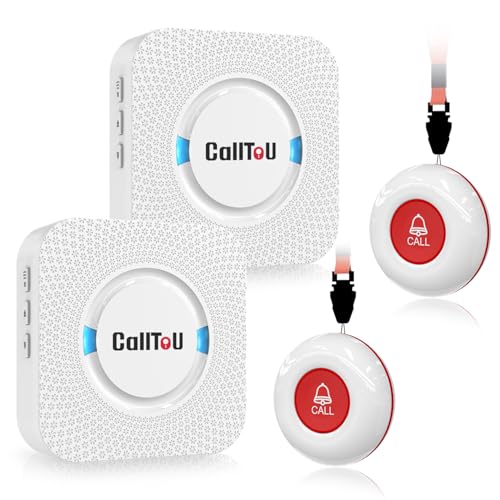
CallToU Caregiver Pager 2 Wireless Buttons

CallToU Wireless Caregiver Pager Call Button

CallToU Caregiver Pager Wireless Call Button

CallToU Wireless Caregiver Pager Alert Button

Medical Guardian MGMini Medical Alert Device Black

Medical Guardian MGMini Medical Alert Device Rose Gold

Medical Guardian MGMini Medical Alert Device Pearl
The Picks, Examined More Closely
Two call buttons make this CallToU set useful for a home where support is needed from more than one regular spot. You can place a button beside a bed and keep another near a preferred chair, rather than moving a single transmitter through the day.
The receivers plug into wall outlets and have a stated open-area range above 500 feet. In a typical single-level home, that flexibility may make kitchen-to-bedroom coverage easier, though walls and room layout still matter.
Real Benefits
- Two buttons support separate daily resting areas.
- Two receivers can keep alerts audible in different rooms.
- Five volume levels help you tailor sound to household activity.
- Water- and dust-resistant components suit bathroom placement.
Things To Consider
- Each receiver needs an available wall outlet.
- Open-area range does not describe coverage through every wall.
More receivers change the practical role of this CallToU set. Compared with the two-receiver version, three plug-in receivers give you another location for hearing an alert, which suits homes with a kitchen, bedroom, and den in regular use.
Its two buttons can be worn using the included neck strap or placed with a bracket or adhesive backing. You may prefer fixed placement for a predictable routine, while a pendant position keeps the button close during movement around the home.
Practical Pluses
- Three receivers spread sound across more living areas.
- Two transmitters allow separate wearable or mounted setups.
- Receiver volume adjusts from silent to 110 dB.
- Fifty-five tones can help distinguish the alert sound.
- Water- and dust-resistant design supports varied placement.
Worth Noting
- Three receivers require three accessible outlets.
- More room coverage also means more placement decisions.
- For one button and one room, the smaller CallToU Caregiver Pager Wireless Call Button is less involved.
A single receiver and one call button keep this version focused. That narrower format makes sense for a bedroom-to-kitchen routine, an apartment, or a home where you only need one reliable signaling point.
Like the larger CallToU sets, its receiver plugs into an outlet and offers 55 tones with adjustable volume. Nothing flashy, but fewer pieces can make placement and daily use easier to remember.
What It Does Well
- One-button layout keeps the setup straightforward.
- Wearable and mountable button options suit different routines.
- Five volume settings let you adjust for a quieter room.
Trade Offs
- A single receiver limits where the alert can be heard.
- You need an outlet in the room where sound matters most.
- Large homes benefit more from the CallToU Wireless Caregiver Pager Call Button.
- Open-area range can change with interior construction.
Who It Suits Best
You benefit most from this compact set in an apartment or a home with one main support zone.
Where Another Pick Suits Better
CallToU Wireless Caregiver Pager Alert Button suits homes needing three buttons and three receiver locations.
This CallToU configuration is built around broader in-home placement, with three buttons and three receivers. That makes it a practical fit for a household where support is needed in separate bedrooms, a bathroom, and a shared living area.
Each button can hang from a neck strap or be fixed in place, while the receivers use standard outlets. In homes with several active rooms, the extra hardware may feel worthwhile because you can avoid carrying one button between locations.
Everyday Wins
- Three buttons allow multiple regular access points.
- Three receivers distribute alerts around a larger layout.
- Fifty-five tones provide audible customization.
- Five volume levels support quieter or busier rooms.
- Water- and dust-resistant components suit bathroom use.
- Stated open-area range exceeds 500 feet.
Minor Gripes
- Three receivers need careful outlet planning.
The MGMini serves a different role from CallToU’s outlet-based pagers because you can wear it away from home. Its SOS button, meaning a dedicated emergency help signal, works with a built-in two-way speaker and a monitoring service after activation.
You can wear the black device with an included lanyard or use its belt clip. For errands, walks, or visits where a plug-in receiver stays behind, that portability may justify the subscription requirement.
What Makes Sense
- Wearable design supports use away from a fixed room.
- Two-way speaker enables spoken contact through the device.
- Lanyards and belt clip offer different carry positions.
- OmniSIM accesses AT&T and Verizon 4G LTE networks.
Room For Improvement
- Monitoring service activation is required before use.
- A recurring subscription changes the ownership commitment.
The rose gold MGMini carries the same portable monitoring approach as the black version, with a different exterior finish. That detail can matter when you want a wearable device that fits more comfortably into your everyday clothing and accessories.
You can use the supplied lanyard or belt clip, and the device connects through its built-in speaker after service activation. For regular outings, the honest read is that your comfort wearing it consistently matters as much as the color.
Bright Spots
- Rose gold finish offers a less utilitarian appearance.
- Included lanyards support neck-worn carry.
- Belt clip provides an alternative to a pendant position.
- Two-way speaker supports direct conversation after activation.
- Dual-network 4G LTE access supports use away from home.
Points To Note
- You must activate monitoring before relying on device features.
- Subscription service is part of the ongoing setup.
- For room-based notification without monitoring, CallToU Caregiver Pager 2 Wireless Buttons is more direct.
Made For
You benefit most when a wearable monitored device fits your errands, visits, and everyday time outside the house.
Consider Something Else When
Medical Guardian MGMini Medical Alert Device Pearl suits you better when you prefer its pearl finish for daily wear.
The pearl MGMini offers the same wearable format and monitored connection as the black and rose gold versions. Its value is not additional household coverage, but a color choice for someone who wants the device to feel less conspicuous as part of a daily outfit.
Pressing its emergency button links you to the monitoring service through a two-way speaker after activation. For a routine that includes shopping, social visits, or time outdoors, a wearable system reaches places an outlet-based receiver cannot.
What Pays Off
- Pearl finish offers another wearable style option.
- Included lanyards support familiar necklace-style carry.
- Belt clip adds a waist-worn placement choice.
- Two-way speaker enables communication through the device.
Softer Spots
- Service requires activation before the device can connect to monitoring.
- A subscription is necessary for its monitored function.
- Color selection is personal, so compare finishes before settling on one.
What Matters Before Setting Up Home Alerts
Match Coverage to Your Routine
A plug-in pager works well when support stays within the home and the alert only needs to reach nearby rooms. Count the places where you actually spend time, then match that number to the receiver count. Two or three receivers can make more sense than one in a multi-room home, but each receiver needs an outlet.
Decide Between Fixed and Wearable Access
Mounted buttons create a predictable location beside a bed, chair, or bathroom door. A neck-worn button stays nearby while you move about, though you’ll want a routine that makes wearing it comfortable and consistent. Medical Guardian MGMini devices add portable monitored communication, while CallToU systems focus on signaling within the household.
Check Sound and Placement Needs
Tone selection helps you recognize an alert quickly, while adjustable volume lets you suit quieter bedrooms or busier living areas. Place receivers where daily activity occurs rather than where an outlet merely happens to be open. Bathroom placement can be particularly useful, and the CallToU button and receiver designs are described as water- and dust-resistant.
Plan for Service Commitments
A monitored wearable requires activation and an ongoing subscription. That arrangement may fit your lifestyle when time outside the home is frequent. A plug-in pager avoids that service model, but its reach remains tied to receiver placement and home layout.
Details That Shape the Right Setup
Common Shopping Slip Ups
A frequent mistake is counting bedrooms but overlooking bathrooms, kitchens, and favorite chairs. You can avoid that problem by listing the exact places where a button and audible receiver would matter during an ordinary day.
Where the Extra Money Goes
Higher-tier wearable options add mobile network access, two-way communication, and monitored service. That added structure makes sense for regular outings, while a home pager may be the more sensible route for support that stays within household walls.
The Takeaway
Your daily movement pattern should lead the decision. Choose a CallToU pager setup for room-to-room signaling and select the receiver count that matches your living space. Choose a Medical Guardian MGMini variation when a wearable monitored connection fits your routine beyond home. The right system is the one you’ll place, wear, and use consistently.