

A chair that fits your desk but leaves you shifting, slumping, or perching at the edge can make a long workday feel much longer. Your best fit depends on whether you need active sitting, adjustable lumbar positioning, a headrest, or a compact add-on for a chair you already own. These seven options cover home offices, shared desks, study setups, and work areas where better positioning matters.
The Shortlist At A Glance
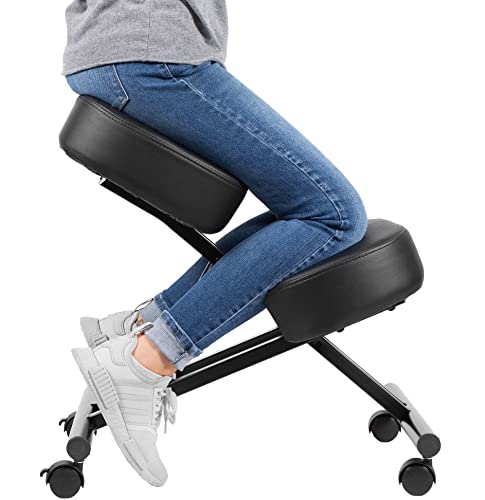
DRAGONN by VIVO Ergonomic Kneeling Chair

Ergalithic 330LBS Mesh Ergonomic Desk Chair

ELABEST Ergonomic Mesh Office Chair

ELABEST X100 Ergonomic Mesh Office Chair

QUTOOL Lumbar Support Pillow for Office Chair

TinyHaven Ergonomic Kneeling Chair

Ergalithic Black Ergonomic Office Chair
A Breakdown Of The Leading Choices
The DRAGONN by VIVO Ergonomic Kneeling Chair changes your sitting angle rather than adding another conventional backrest. Its angled seat and knee pads distribute your position between your lower body and knees, while the 3-inch vinyl cushions provide a padded contact surface.
You may find this style useful during writing, drafting, or computer work where you naturally want to sit more upright. The honest read is that kneeling chairs feel different from regular task chairs, so gradual position changes suit a daily desk routine.
Benefits That Matter
- Height adjusts from 21 to 28 inches for varied desk heights.
- Four casters let you reposition without lifting the chair.
- Metal base supports up to 250 pounds.
- All-black finish fits a home office or classroom.
Things To Consider
- Your body needs time to adapt to the kneeling position.
- The 250-pound capacity should match your intended use.
For a familiar office-chair feel, the Ergalithic 330LBS Mesh Ergonomic Desk Chair takes a more traditional route than the DRAGONN kneeling design. A mesh back promotes airflow, while its lumbar pillow adjusts vertically and in depth to help you place support closer to your natural lower-back curve.
The 90-degree flip-up arms matter in a compact home office because they can slide beneath a desk. For shared workspaces, that storage convenience may matter as much as the 360-degree swivel.
What Makes Sense
- Lumbar pillow moves 1.8 inches vertically and 1 inch in depth.
- Flip-up armrests create a cleaner under-desk storage setup.
- Mesh back gives your desk setup a more breathable seating surface.
- Five-point base supports up to 330 pounds.
- Rocking range spans 90 to 120 degrees.
Worth Noting
- Armrests must remain raised to tuck the chair under a desk.
- The upright lock sits at 90 degrees, so confirm that angle suits your work style.
The ELABEST Ergonomic Mesh Office Chair brings adjustability into a conventional task-chair shape. Its curved mesh back, movable lumbar support, adjustable armrests, and tilt system target computer work where your upper body stays in one position for long stretches.
Compared with the Ergalithic model, this chair puts more emphasis on coordinated back and arm positioning. You may appreciate that approach during keyboard-heavy work, where armrest placement can affect how relaxed your shoulders feel.
Strong Points
- Curved mesh back follows the shape of your seated posture.
- Adjustable lumbar support gives you more placement control.
- Adjustable armrests help bring forearms closer to desk level.
Trade Offs
- Several adjustable parts mean you should set aside time for personal setup.
- A mesh task-chair profile may not suit your preference for a padded high-back seat.
- Confirm your desk height before settling on armrest placement.
Who It Suits Best
Focused desk workers who want mesh airflow with adjustable lumbar and arm support will get the most from this chair.
Where Another Pick Suits Better
ELABEST X100 Ergonomic Mesh Office Chair suits you better when a footrest and headrest are part of your preferred seated routine.
The ELABEST X100 Ergonomic Mesh Office Chair is built around adjustability rather than a stripped-back task-chair layout. Its 3D lumbar system, 5D flip-up armrests, breathable headrest, and footrest give you several ways to alter your seated position through a long desktop session.
Unlike the ELABEST chair above, this version adds a two-position footrest that extends 18 inches. That may suit you when your work area doubles as a place to read, watch, or take a break between focused tasks.
The Case For It
- 3D lumbar support adjusts depth, height, and rotation.
- Five-direction arm adjustments support varied desk and mouse positions.
- Flip-up arms can help the chair fit beneath a standard desk.
- Footrest extends 18 inches for reclined sitting breaks.
- Three recline stages offer more than one working posture.
- Breathable headrest provides an upper-body contact point.
Minor Gripes
- More adjustment controls require a little more setup attention.
- The extended footrest needs open space in front of your chair.
The QUTOOL Lumbar Support Pillow takes a different path from replacing your whole chair. High-density molded memory foam creates a shaped cushion that straps onto an office chair, car seat, or similar backrest, while the mesh cover supports airflow around the pillow.
Its two adjustable straps are longer than earlier strap versions, so you can secure it around more chair backs without an added extender. Nothing flashy, but it can be a sensible first step when your current desk chair otherwise fits your workspace.
Useful Strengths
- Two adjustable straps help hold the cushion against a chair back.
- Longer straps accommodate a wider selection of chair shapes.
- Molded memory foam provides a more structured cushion profile.
- Mesh cover suits desks, vehicles, and shared seating areas.
Room For Improvement
- You need a chair back with room for the dual straps.
Made For
You benefit most when your current chair is usable but needs added lower-back contouring at your regular desk or in your vehicle.
Consider Something Else When
Ergalithic 330LBS Mesh Ergonomic Desk Chair makes more sense for you when you also need adjustable arms, seat height, and a rolling base.
The TinyHaven Ergonomic Kneeling Chair is another active-sitting option, though its solid wood frame and rocking capability give it a distinct character from the wheeled DRAGONN by VIVO chair. Its seat angle opens your hip position, and the foam cushions are designed for kneeling sessions rather than a standard office-chair posture.
Twenty-four angle combinations give you room to tailor the setup to your height. Start with shorter desk sessions and move around between tasks, since your legs and core will take on a different role here.
Standout Benefits
- Twenty-four angle combinations support more personal positioning options.
- Solid wood frame supports up to 250 pounds.
- Foam cushions use a slow-return design for kneeling contact points.
- Gentle rocking supports movement during focused desk work.
- Works as a desk seat, meditation stool, or cross-legged seat.
Points To Note
- Plan a gradual adjustment period rather than full-day use immediately.
- Rocking movement may not suit a tightly packed workstation.
- Assembly is required before use.
The Ergalithic Black Ergonomic Office Chair combines a mesh back, adjustable lumbar pillow, and 3D headrest for a more supported high-back setup. Unlike the earlier Ergalithic desk chair, this version adds the headrest, which may appeal to you during longer seated stretches away from the keyboard.
Its stated fit range spans users from 4.9 to 6.2 feet, and the wide cushioned seat supports a roomier desk-chair profile. The flip-up arms also keep the chair practical for a desk that needs to stay clear after work.
Reasons It Performs
- 3D headrest lets you adjust upper-body support placement.
- Lumbar pillow moves vertically and in depth.
- Flip-up arms support under-desk storage.
- Mesh back adds airflow during extended desk use.
- Five-point base supports up to 330 pounds.
Softer Spots
- Headrest positioning is most relevant for your height within the stated range.
- The wider seat may require more space than a compact task chair.
What Matters Before Settling Into a Posture Chair
Start With Your Work Position
Your chair needs to work with your desk, keyboard, monitor, and usual hand position. A conventional mesh chair suits computer-heavy routines where lumbar placement, armrest height, and seat height need adjustment. A kneeling chair changes how you distribute your weight, so it works better for people comfortable rotating between positions.
Check Support Placement
Lumbar support means a shaped contact area intended for your lower back. Look for vertical and depth movement when more than one person uses the desk, because the same support position rarely fits every torso. A headrest adds another contact point, though it matters most when its position matches your height.
Measure the Workspace
Flip-up arms help in a small room because they can clear the desk edge for storage. Footrests need open floor space ahead of the chair, while kneeling chairs need enough room for you to move in and out comfortably. A wider seat can feel accommodating but may change how much clearance remains around your desk.
Think Beyond One Sitting Style
Long desk days usually go better with position changes than with staying frozen in one posture. A rolling chair supports quick movement around a workstation, while a rocking kneeling chair encourages more active sitting. Choose the style that fits how you naturally work, rather than forcing a radically different routine.
Details That Can Change Your Fit
Common Shopping Slip Ups
Avoid choosing only by cushion thickness or chair appearance. Check your desk height, available floor space, armrest clearance, and whether you need a headrest before narrowing the list.
Where The Extra Money Goes
Higher-tier chairs often add more adjustment points, such as movable lumbar systems, multi-axis arms, reclining stages, headrests, or footrests. Spending more makes sense when you use the chair for many hours and will actually use those adjustments.
The Takeaway
Your best chair depends less on a single feature and more on how your body, desk, and daily routine work together. Choose the DRAGONN by VIVO or TinyHaven for active sitting, a mesh task chair for adjustable desk support, or the QUTOOL pillow for improving a chair you already use. A well-matched setup should feel natural enough that you can focus on your work instead of constantly shifting for comfort.